

Skip to content

Free for Android and iPhone

The 20-20-20 eye break reminder that runs on its own.

Every 20 minutes, EyeBlinkIt reminds you to look at something about 20 feet (6 m) away for 20 seconds: the 20-20-20 rule recommended by the American Optometric Association. Set your hours once and the eye rest reminders come by themselves. There's no timer to start.

  • Get EyeBlinkIt on Google Play
  • Download EyeBlinkIt on the App Store
  • Free on Android and iPhone
  • No account needed
  • 7 app languages
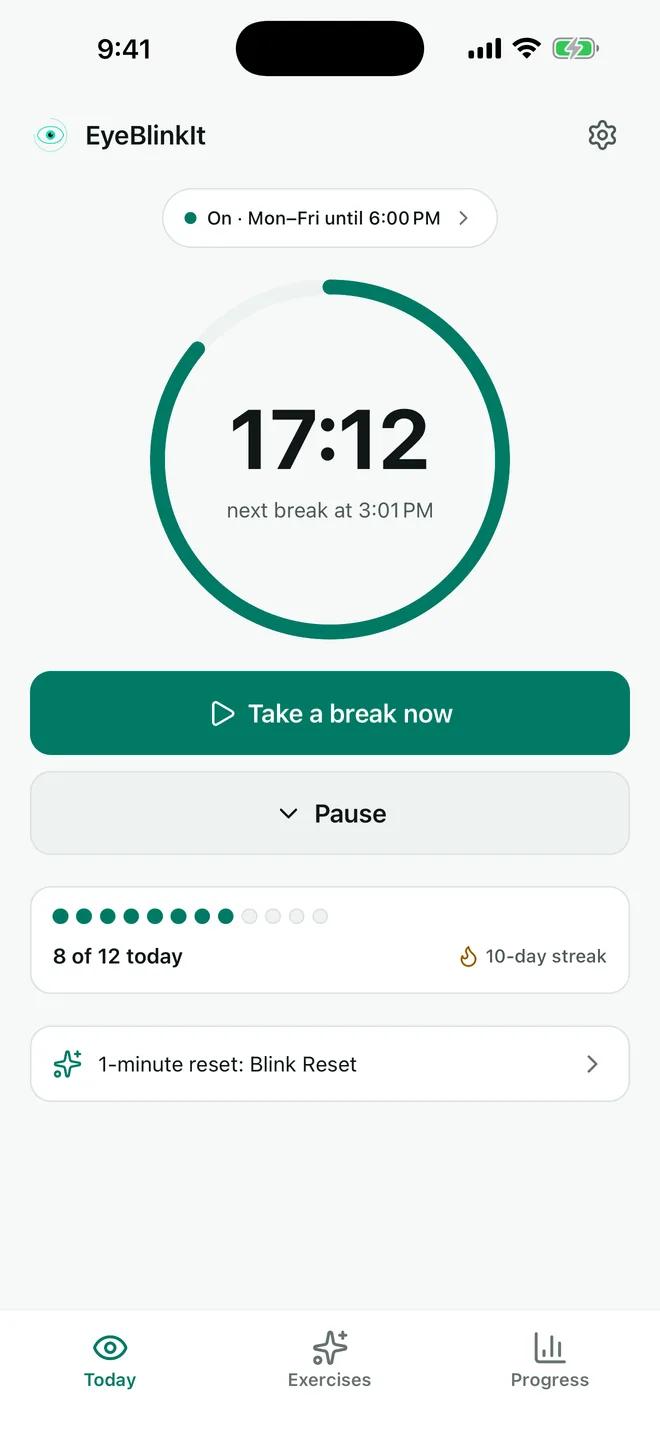
EyeBlinkIt Today screen: next break in 17 minutes 12 seconds, reminders on Monday to Friday until 6 PM, 8 of 12 breaks done today
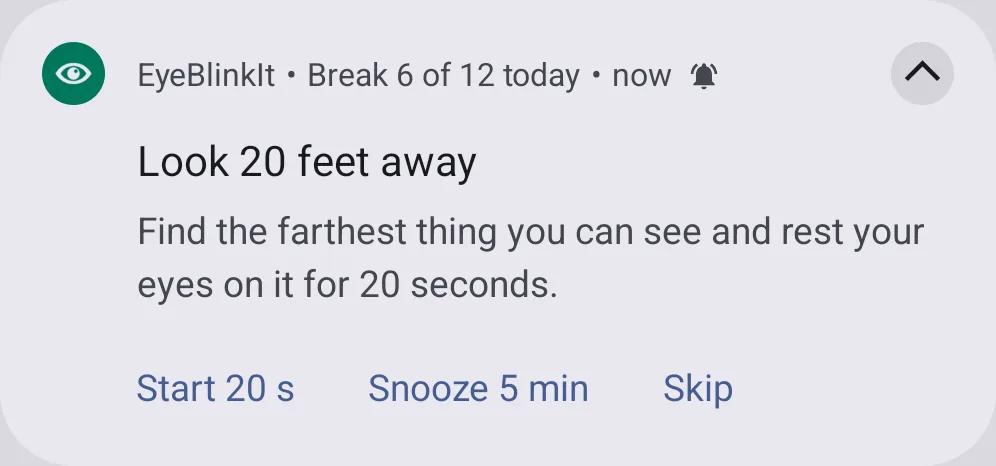
EyeBlinkIt reminder notification on Android: Look 20 feet away, with Start 20 s, Snooze 5 min and Skip buttons

Why it slips

Screen time is easy to lose track of.

A coding session, an exam revision block or a pile of spreadsheets can run for hours without one look away. You know a short break would help. You just don't notice the time going.

The 20-20-20 rule is a simple way to build breaks into that time. The hard part is remembering it, every 20 minutes, all day. That is the part EyeBlinkIt does for you.

15 → 5–7
Blinks a minute: about 15 normally, and 5 to 7 while using a computer or another digital screen. Source: American Academy of Ophthalmology
7 hours
A day on the computer, at the office or at home, for the average American worker. Source: American Optometric Association

How it works

The 20-20-20 rhythm, kept for you.

Most people know the rule. Few manage it on a busy day, because the reminder is the part that slips. EyeBlinkIt runs the rhythm in the background during the hours you choose, and the break itself is guided.

20minutes
Of screen time. EyeBlinkIt counts it for you while you work, during the hours and days you set.
20feet away
About 6 metres. A window, the far end of a room or a corridor: anywhere your eyes can look far.
20seconds
A calm countdown, with optional voice guidance, tells you when to look back. Then the next 20 minutes start.
One working hour with EyeBlinkIt on(reminders every 20 minutes, 20-second breaks)
  1. 9:00 to 9:20: 20 minutes of screen time, then a 20-second break at 9:20.
  2. 9:20 to 9:40: 20 minutes of screen time, then a 20-second break at 9:40.
  3. 9:40 to 10:00: 20 minutes of screen time, then a 20-second break at 10:00.

Three breaks an hour add up to one minute away from the screen. Outside your hours, and during quiet hours at night, EyeBlinkIt stays silent.

What's in the app

Built so the break actually happens.

Everything in EyeBlinkIt serves one job: getting you to look away for 20 seconds, several times a day, without having to think about it.

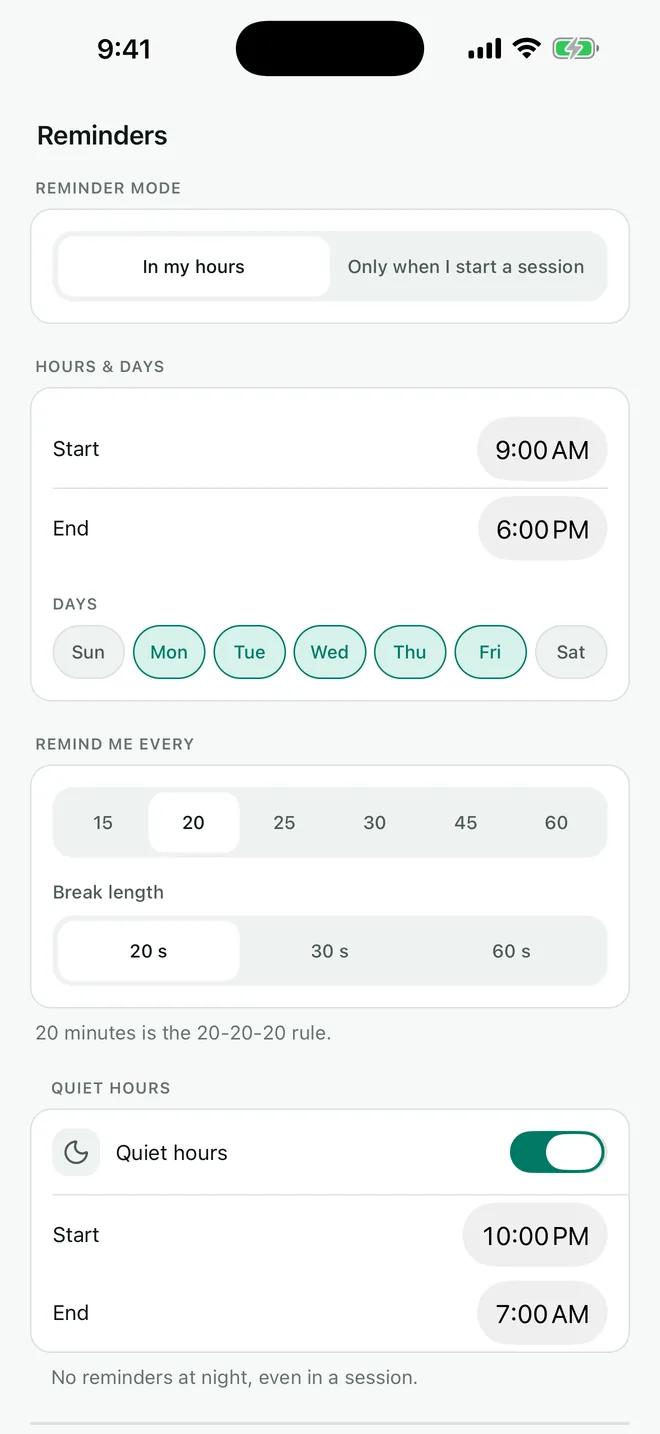
EyeBlinkIt reminder settings: in my hours from 9:00 AM to 6:00 PM, Monday to Friday, remind every 20 minutes, 20-second breaks, quiet hours at night

01 · Reminders

Reminders on your hours

Pick work hours, all day, or your own hours and days. Reminders start and stop by themselves, so there is nothing to switch on each morning.

  • Remind every 15, 20, 25, 30, 45 or 60 minutes. 20 is the 20-20-20 rule
  • Breaks of 20, 30 or 60 seconds
  • Quiet hours at night, and on Android it stays quiet in Do Not Disturb
  • Gentle sounds, vibration only, or silent
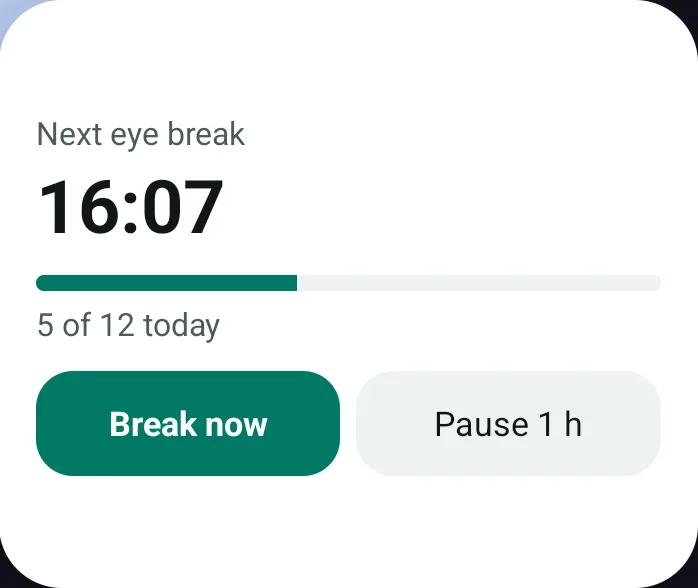
EyeBlinkIt reminder notification on Android: Look 20 feet away, with Start 20 s, Snooze 5 min and Skip buttonsEyeBlinkIt Android home-screen widget: next eye break in 16:07, 5 of 12 today, with Break now and Pause 1 h buttons

02 · Notification and widget

Act on it without opening the app

Each reminder carries its own buttons. Start a 20-second break, snooze or skip right from the notification, then get back to what you were doing.

  • On Android, start a break without unlocking your phone
  • Snooze when you are busy, or pause for a meeting, an hour or the rest of the day
  • On Android, it waits while you are on a call
  • Android home-screen widget with your next break, today's progress and a Pause button

03 · The break

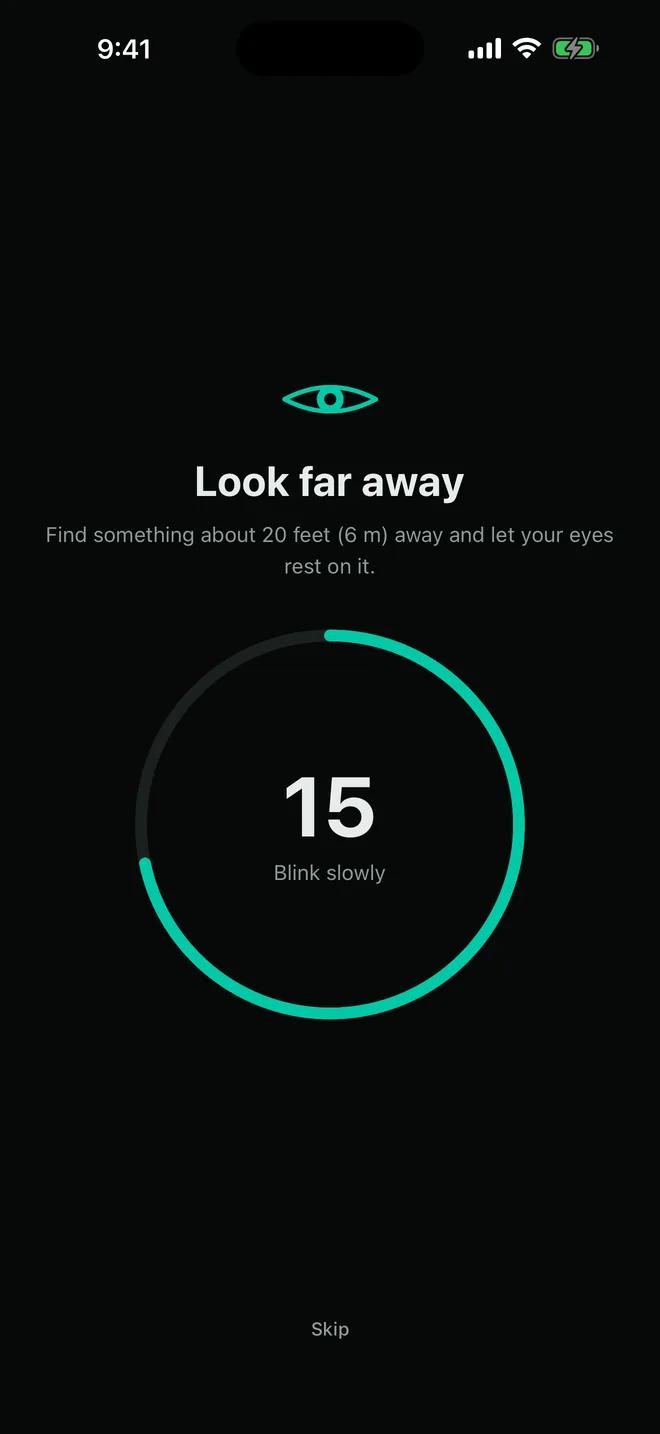
A guided 20-second break

A calm countdown tells you when to look back. Turn on voice guidance and you can look away from the screen and just listen. Choose a far look, a far look with blinks or an eyes-closed rest, or let them rotate.

On iPhone the countdown keeps going with the phone locked.

EyeBlinkIt break screen on a dark background: Look far away, with a 15-second countdown ring

04 · Exercises

Guided eye exercises

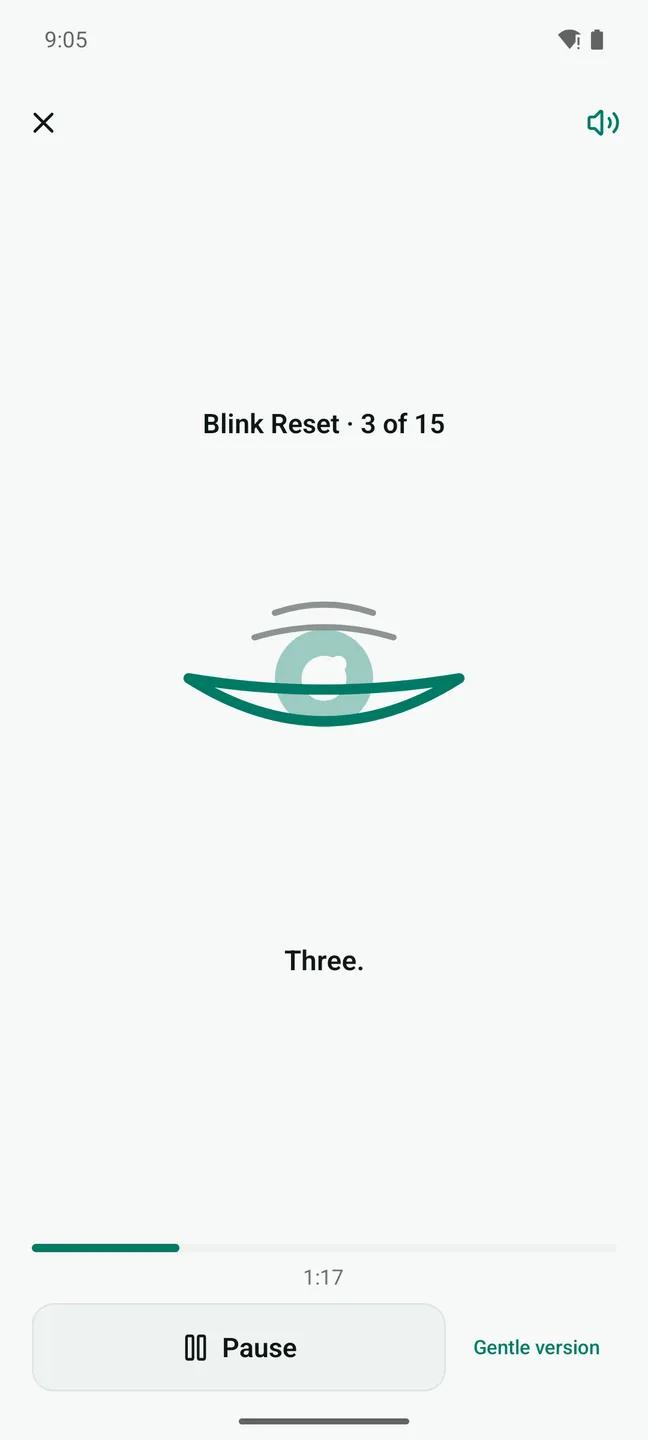
Blink Reset is fifteen slow, full blinks: close, squeeze gently, open. There is also palming, near–far focus switching, gentle eye movements, a follow-the-dot exercise, a 3-minute Desk Reset and an evening wind-down.

Each one has voice guidance, gentle haptics and a clear animation. Optional blink reminders at the times you choose.

EyeBlinkIt Blink Reset exercise in progress: blink 3 of 15, with an animated eye and the spoken count
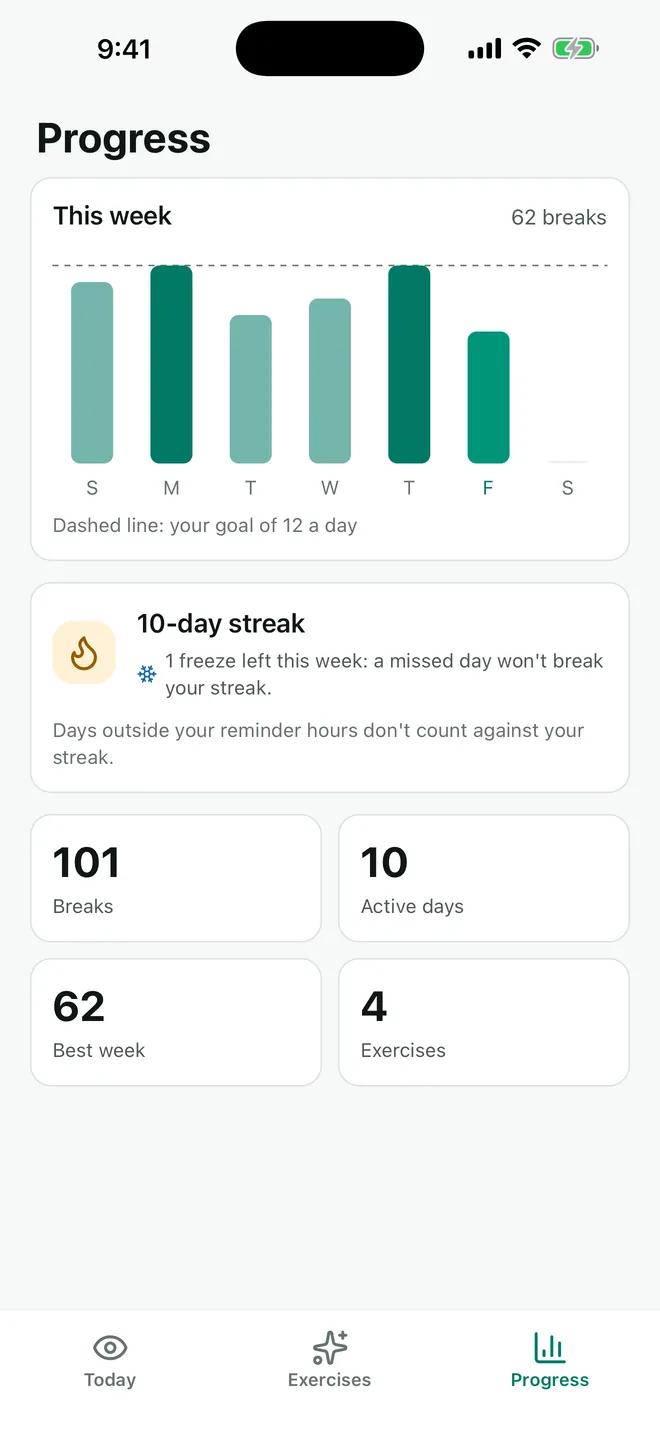
EyeBlinkIt progress screen: weekly bar chart against a goal of 12 breaks a day and a 10-day streak with one freeze left this week

05 · Progress

See the habit grow

A habit sticks when you can see it. EyeBlinkIt keeps score quietly, without turning your breaks into a game.

  • Today's breaks against your daily goal
  • Streaks with a free day off each week, so one busy day doesn't break them
  • A weekly chart of your breaks and exercise minutes
  • Days outside your reminder hours don't count against your streak

06 · Reliability

Reliable on every phone

Reminders are scheduled on the phone itself, not pushed from a server. EyeBlinkIt checks that they can arrive on time and walks you through the phone settings that matter, including the battery settings on Samsung, Xiaomi, Oppo, Vivo, Huawei, Tecno and Infinix phones.

07 · Privacy

Private by design

  • No account needed. Your progress stays on your phone
  • Optional backup with Google or email (and Apple on iPhone) to keep your streak on a new phone
  • Usage analytics and crash reports can be turned off in Settings
  • Delete your data from the app at any time
  • Free. No ads on iPhone. On Android, one small banner ad on the main screens, never during a break, an exercise or a reminder

Read the privacy policy

Who it's for

Made for long screen days.

If your work, study or downtime happens on a screen, the breaks are the first thing to go. EyeBlinkIt is for the days when you would never remember them yourself.

  • Office and remote workersat a computer all day
  • Studentsstudying on a laptop, tablet or phone
  • Developers, designers and writersin long focus sessions
  • Gamersand anyone who loses track of screen time

Seven languages, five with a recorded voice.

The whole app is translated, and Arabic uses a right-to-left layout. The language follows your phone.

  • EnglishEnglishVoice
  • EspañolSpanishVoice
  • FrançaisFrenchVoice
  • Português (Brasil)Portuguese (Brazil)Voice
  • हिन्दीHindiVoice
  • Bahasa IndonesiaIndonesian
  • العربيةArabic

FAQ

Questions, answered.

Something else? Write to [email protected]. New to the rule itself? Start with the 20-20-20 guide.

Is EyeBlinkIt free?

Yes. EyeBlinkIt is free on Google Play and the App Store. The Android app shows one small banner ad on its main screens, never during a break, an exercise or a reminder. The iPhone app has no ads.

What is the 20-20-20 rule?

Every 20 minutes, look at something about 20 feet (6 metres) away for 20 seconds. The American Optometric Association recommends it for long stretches of screen use. EyeBlinkIt keeps that rhythm for you.

Read the 20-20-20 rule guide

Do I have to start a timer or keep the app open?

No. Set your hours once (work hours, all day, or your own hours and days) and the reminders start and stop by themselves. They are scheduled on your phone, not sent from a server.

Can I change how often it reminds me?

Yes. Choose a reminder every 15, 20, 25, 30, 45 or 60 minutes and a break of 20, 30 or 60 seconds. Quiet hours keep it silent at night, and you can snooze, or pause for a meeting, an hour or the rest of the day.

Will the reminders arrive on time?

EyeBlinkIt checks that reminders can arrive on time and, on Android, walks you through the phone settings that matter, including the battery settings on Samsung, Xiaomi, Oppo, Vivo, Huawei, Tecno and Infinix phones. Phones can still delay apps running in the background, so no app can promise every reminder to the second.

Do I need an account?

No. Your settings and break history stay on your phone. If you want to keep your streak when you change phones, you can turn on an optional backup with Google or email, or with Apple on iPhone.

What data does EyeBlinkIt collect?

Without backup, your reminder settings and break history are not sent to us. The app sends usage analytics and crash reports, and you can turn both off in Settings, Privacy. Ads in the Android app come from Google AdMob. The privacy policy lists everything.

Read the privacy policy

How do I delete my data?

In the app, open Settings, Account & backup and tap Delete my account and data (or Delete my data on this phone if you are not signed in). You can also email [email protected] from the address you signed in with.

How deletion works

Which languages does the app speak?

English, Spanish, French, Portuguese (Brazil), Hindi, Indonesian and Arabic, with recorded voice guidance in English, Spanish, French, Portuguese (Brazil) and Hindi.

Is EyeBlinkIt a medical app?

EyeBlinkIt is a wellness and habit tool. It is not a medical device and does not diagnose, treat, cure or prevent any condition. If you have eye discomfort or changes in your vision, please see an eye care professional.

Your next break is 20 minutes away.

EyeBlinkIt is free on Google Play and the App Store. Set your hours once and it takes it from there.

  • Get EyeBlinkIt on Google Play
  • Download EyeBlinkIt on the App Store